QOps: key benefits of using

Qlik is one of the leading BI system providers. Its main products are QlikView and Qlik Sense (data analysis and visualization tools that provide the ability to access and explore data from different sources). Qlik users can independently develop visualization objects (reports, data models, analytical programs, etc.) without IT specialists participation. Qlik solutions are relevant for different use cases, for example:

  • sales analysis (market analysis, marketing campaign management, demand analysis, product ratings, managers, suppliers, buyers, etc.);
  • financial analysis (liquidity indicator, budgeting, income, net profit, margin, income taxes, expenses, etc.);
  • inventory analysis (purchase volume, purchase prices and discounts, their relationship with sales, income and profitability, inventory value, «frozen» goods, excess stock, calculation of the optimal order, analysis of purchase prices and suppliers, etc.);
  • analysis of logistics processes (cost of delivery and shipment, analysis of cargo, routes, carriers, etc.);
  • marketing analysis (marketing campaigns cost, conversion, customer segmentation, customer life cycle assessment, sales funnel, etc.).

However, all this is preceded by an extensive process of Qlik application development with individual needs and business requests. QOps console tool developed by DataLabs is designed to solve a number of tasks in the development, version control and subsequent deployment of Qlik applications.

Development

The main QOps advantage for developers is the ability to use previously developed components in one project and implement them in another. Developers often work on several projects in parallel, and the need to transfer ready-made features from one project to another is relevant. The traditional approach involves some complexity, steps and time costs to implement the transfer. So, developer needs to go to the previous project that may be on a different server, find the appropriate reference points where there may be changes (in the script, charts, variables, etc.). QOps allows to solve this problem very quickly. Using this tool, it becomes possible to save a component developed in one project as a separate commit and, by selecting it directly in the repository, see all the necessary changes. And then it is possible to transfer it to the required project. That is, QOps is an auxiliary tool that allows to extract source codes from Qlik applications.

Also, QOps allows to reduce the routine manual work of developers during deployment and troubleshooting. For example, several developers work on one application, and each of them develops its own part. Then, to create one whole project, developers need to agree on how changes will be made from each developer. Another problem is that 2 separate finished parts may not work together. QOps automates this process with GitLab, GitHub, or Bitbucket repositories where it merges, checks for conflicts, and resolves if necessary. Thus, developer doesn’t need to keep all the changes in his mind to implement a certain task or functionality. It is important to note that a developer is an ordinary person who sometimes makes mistakes. Any manual process, in particular deployment, increases the risk of making mistakes. QOps for its part helps prevent this from happening.

Another benefit of QOps is the ability to move a project from one environment to another. Today a lot of organizations are moving to the cloud that allows users to work from anywhere. However, there are companies that require developer to work from a specific isolated device. QOps allows to extract source code from one environment and work in another. There is a question of compliance with safety requirements. Since QOps only extracts a source code and not the data itself, there is no security breach.

Deployment

Using QOps, it’s possible to simplify deployment process and even deploy applications without detailed knowledge of its development specifics. This can be done by a team leader, or a project manager, or a DevOps. User can also use placeholders in the source code that will be automatically substituted when migrating source codes between environments or clients. This ensures correct automatic deployment without any unusual moments or manual changes. So, this reduces time spent on deployment and opens up the possibility of finding new ideas and/or creating a new product.

Version Control

The main task of the version control system is to record changes in a file or a set of files in a certain period. This allows users to return to a previously defined version at any time, return selected files or the entire project to a previous state, track changes and its author, and correct errors if necessary. The version control system allows to divide the source code into branches (separate parts of product development). During the development process they can merge (Development →Master), separate into a separate product that provides complete freedom of action for each developer and each version. It is important to note that a control is based on specific version and only commits changes, not the entire version. QOps allows to get code from developed Qlik applications, put it in a repository in any branch, accumulate changes and explore them (track changes, errors, author of changes, etc.). QOps is an intermediate tool between Qlik and modern Git-based version control systems.

The QOps installation procedure is quite simple, however, it involves some requirements:

  • version of QlikView 12+;
  • QlikView license;
  • version of PowerShell 5.1+;
  • .NET Framework 4.7.2+;
  • Windows Server 2016, Windows Server 2012 R2 or higher.

An example of merge of collaborative Qlik Sense app development

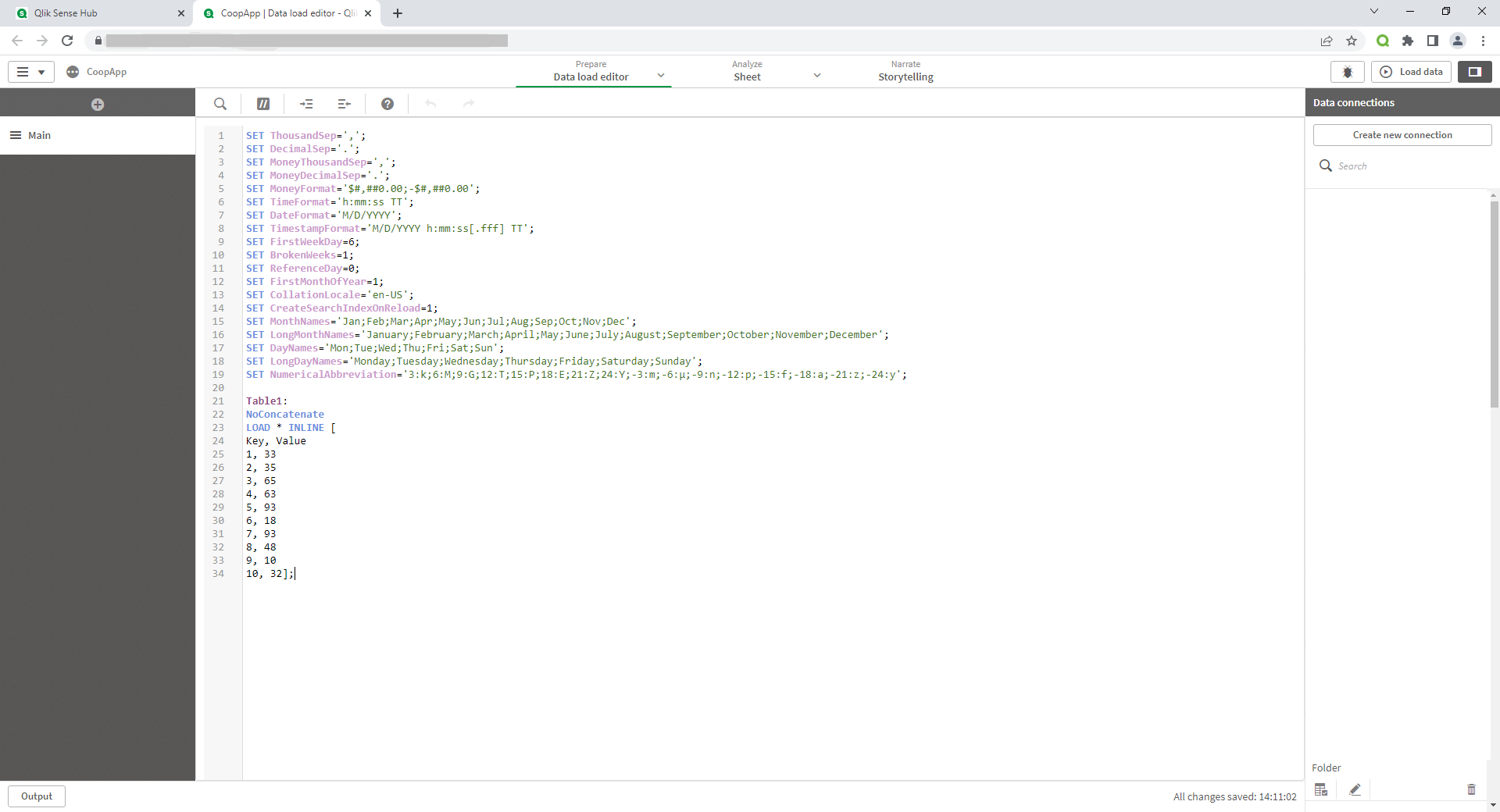
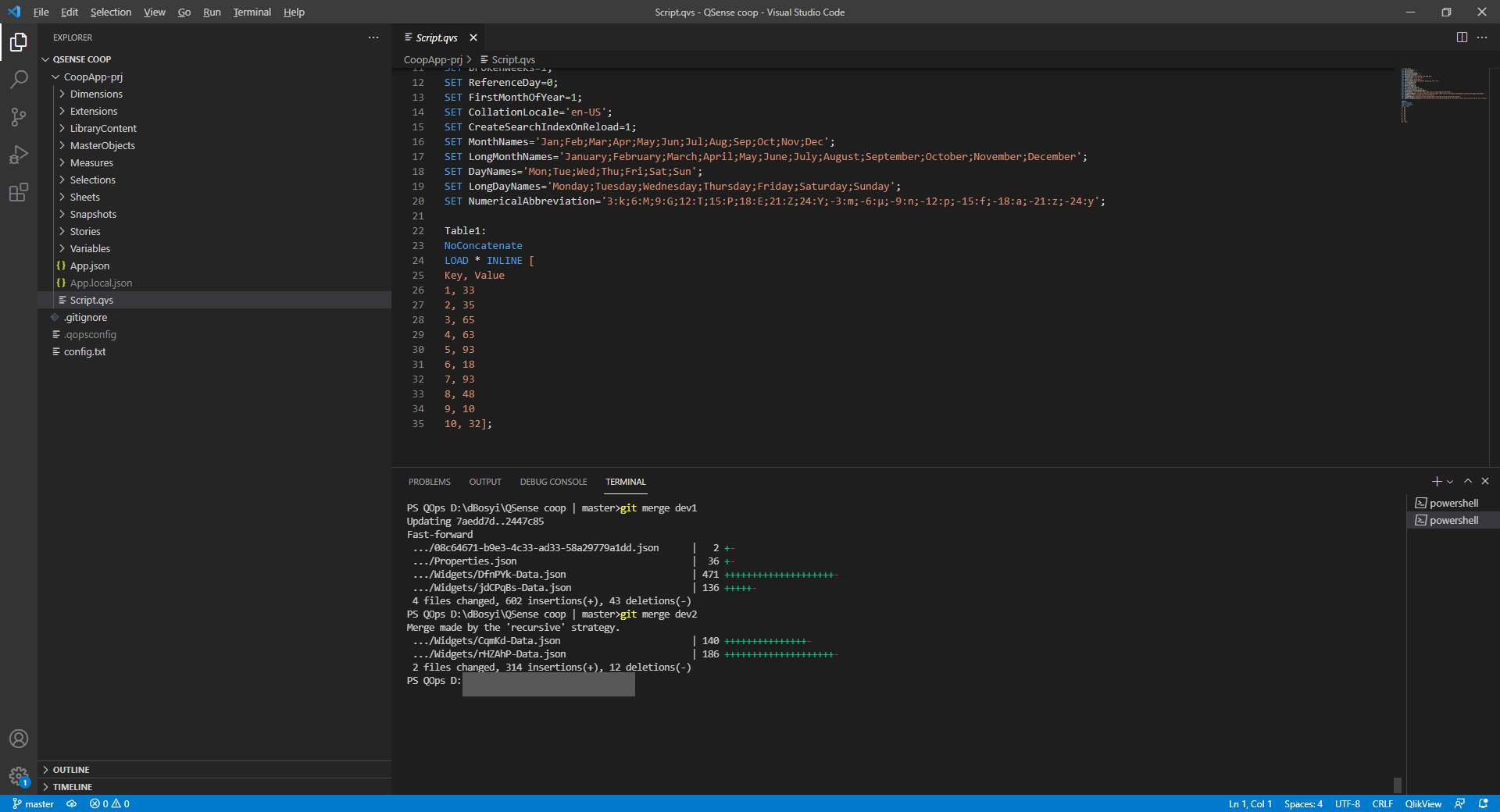
Let's create a new app in Qlik Sense. As a data model we use a synthetic set of values specified in a table form using the INLINE operator.

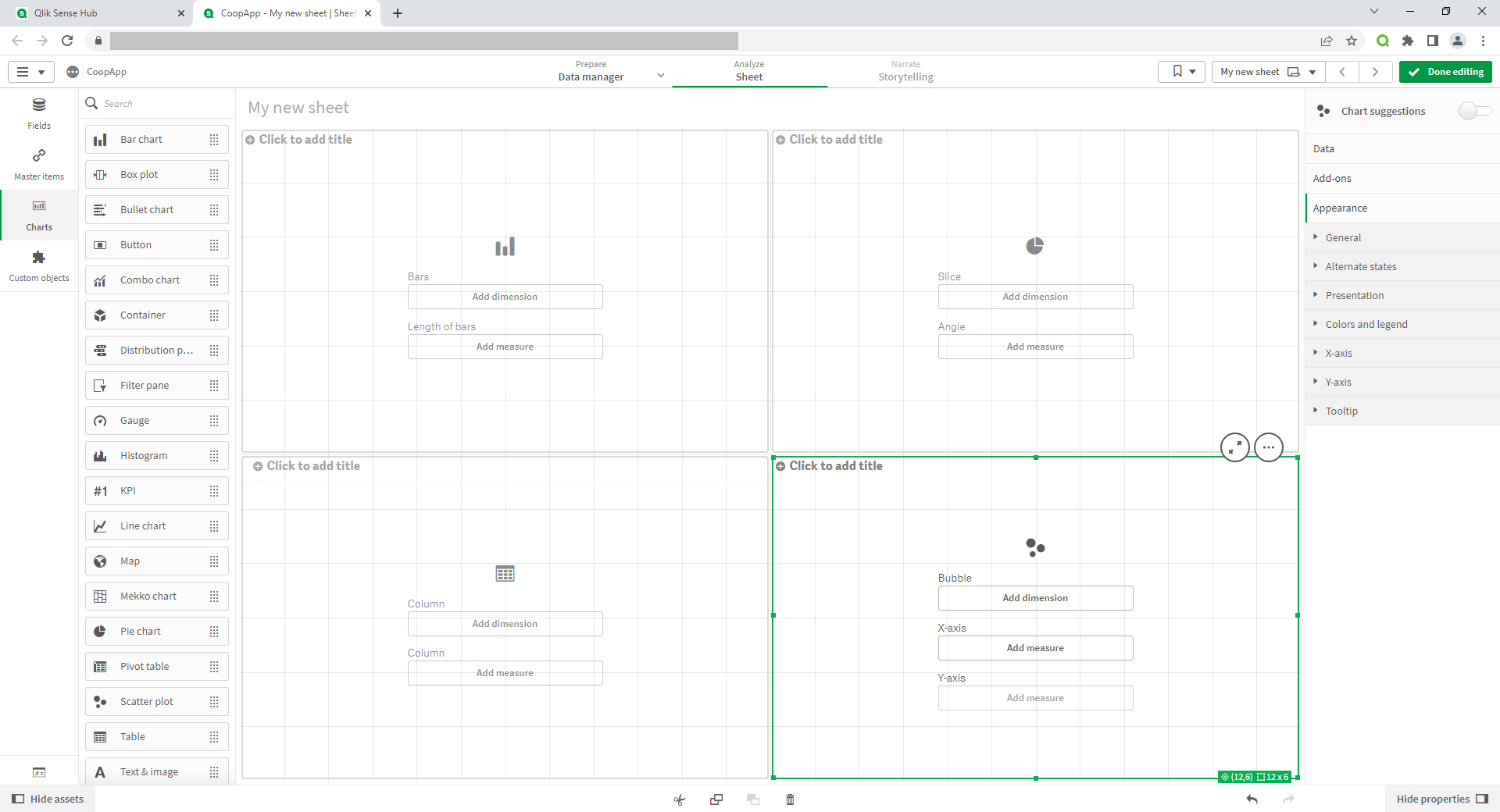
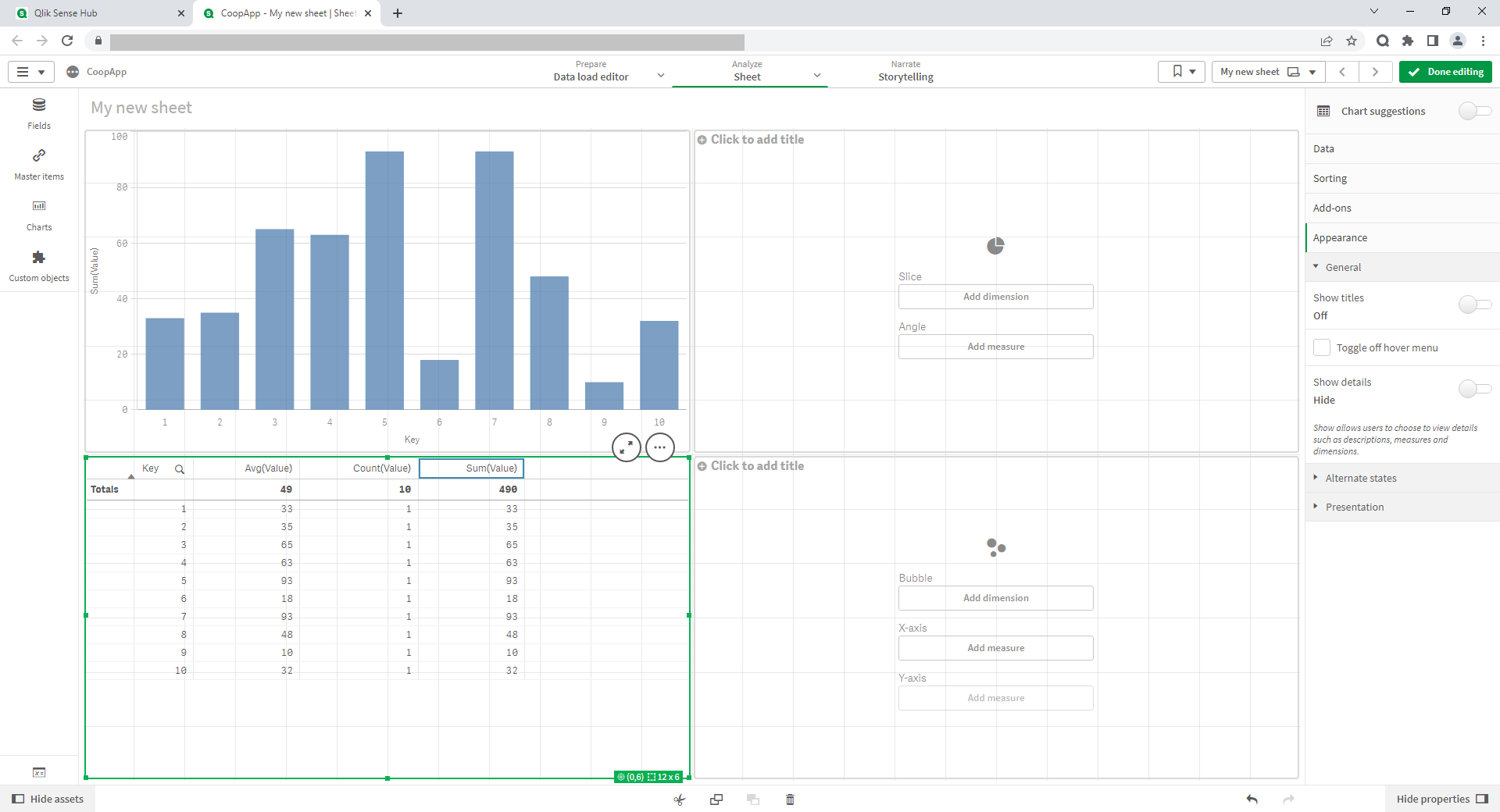
We'll create a draft of the future sheet design in visualization part

Let's save the application and use QOps to check out a new application source code and place it in a GIT repository in the master branch. We'll divide the further application development into 2 developers. They correspond to branches dev1 and dev2.

The first developer is working on the left side of the sheet where he designed the bar chart and the table below it.

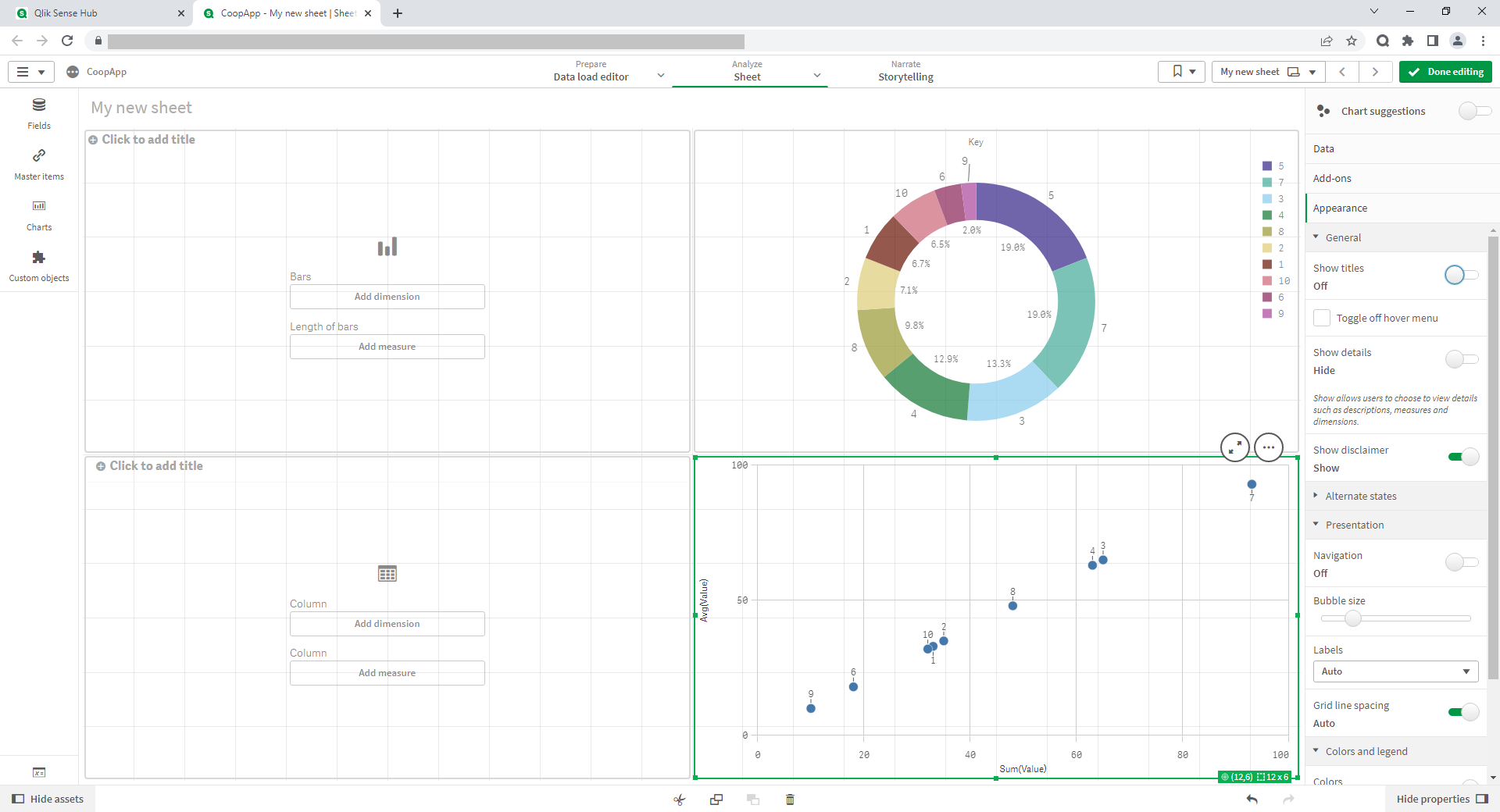
At the same time the second developer is designing the right side of the sheet, where the data is visualized using a donut pie chart and a scatter plot.

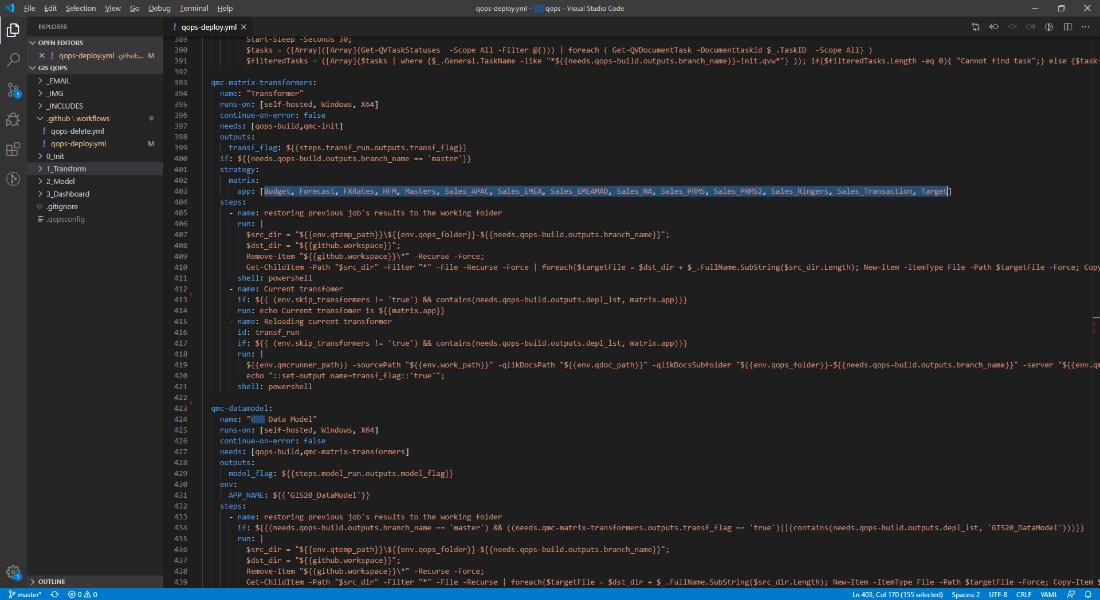
After the work was completed, each of the developers made the appropriate commits to their branches. Let's merge the main branch of the repository with dev1 and dev2 alternately. Below you can see this process in the Visual Studio Code development environment. Due to the use of a draft from the planned visual components, there are no conflicts, and the merge is performed automatically.

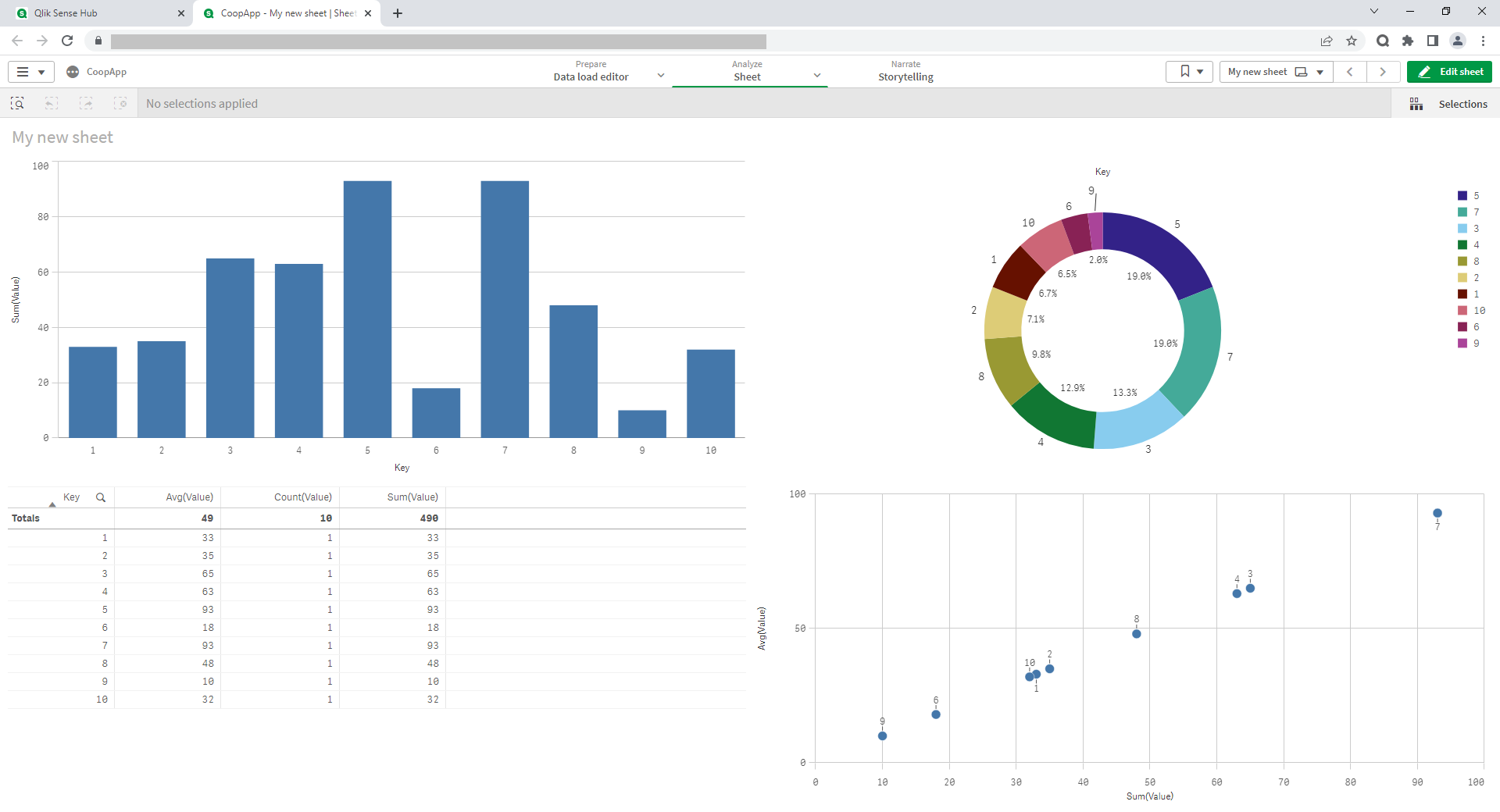
Below is fully designed application sheet after merging and subsequent assembly with results of both developers work.

QOps work principles

The main problem that QOps solves is the difficulty of applying the GIT version control system to the final development file, that contains data, data model, data loading code, codes of all charts and objects for visualization.

What is GIT?

GIT is a version control system that helps track changes made to a codebase, identify the user who made them, and recover deleted or modified code. GIT is one of the most popular open-source version control systems at the moment and is very easy to use. GIT is also completely free software and supports different operating systems (Vac, Windows, Linux, Solaris).

The benefits of GIT are:

  • distributed version control system;
  • the ability to have many independent code branches;
  • atomicity of operations;
  • storing data in .git catalog;
  • using a data model that ensures the cryptographic integrity of the containing repository;
  • the ability to format commits and preview them before applying them within the index.

How to use GIT in the development of Qlik applications?

The problems of applications parallel development and tracking changes in the source code, development process involving more than 1 developer, manual deletion of code and charts are solved by GitLab and GitHub. However, if you put the Qlik Sense/QlikView file on GitLab, this will not work. This file must be divided into separate parts: code, chart settings, variables, extensions etc. Then these parts should be put back into a file. QOps helps automate the process of application disassembling and reassembling.

How does QOps work?

QOps extracts absolutely all source codes from the files of developed applications. Thus, the extracted codes can be placed in the repositories of any version control systems. Modern version control systems have advanced tools for branches, commits, and merges. This allows multiple developers to work on a project in parallel.

QOps allows to automatically build an application from a local or remote repository. Source codes are stored separately from data, that provides flexibility in the development of complex projects. This makes it possible to set up automatic testing and deployment of the application. This, in turn, allows to avoid accidental errors during deploying applications to production, as well as reverting to any previous version of the application, if necessary.

QOps allows to:

  • keep application source code separate from data;
  • compare and analyze changes in the source code of all application objects;
  • collect and implement the developed functionality into the application in parts (they can be created by different developers);
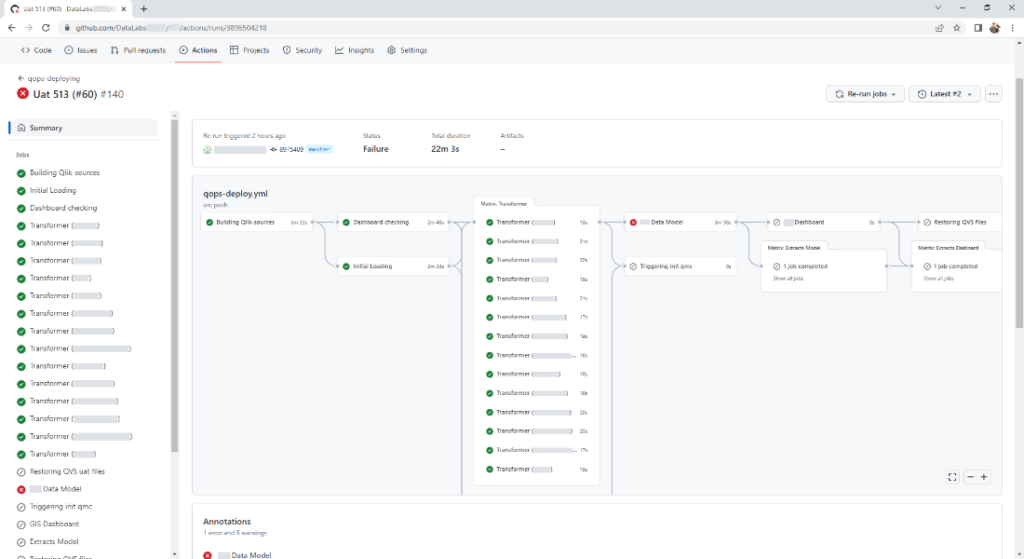
  • set up a pipeline of automatic checks and automatic deployment of the application;
  • quickly find errors and undo incorrect changes.

More information about QOps here

What is QOps and what problems does it solve?

Qlik is a provider of business intelligence and data visualization applications. Its main products are QlikView and Qlik Sense, which have the same logic and analysis algorithm, but a different user interface. QlikView can run in its own environment with custom charts and visualizations and through a web interface. Qlik Sense is focused on web application development.

The Qlik data-driven business intelligence platform features associative connectivity and available graphical capabilities. It allows users to make calculations very quickly by storing compressed information in RAM and quickly accessing it. Qlik allows to connect various data sources from simple files to modern databases, and also provides for the development of individual connectors to the data source.

Qlik Sense is both a development environment and an off-the-shelf application. The result of the development is a large file that includes data, a data model, data loading code, codes for all charts and objects for visualization. Qlik supports built-in SVN and TFS version control. However, there is no way to apply the GIT version control system. This problem is solved by QOps.

QOps is a console tool that removes the complexities of version control and automates Qlik applications development and deployment. The product works in PowerShell, integrates with Qlik, GIT, GITLab/GitHub.

The main problems that QOps helps to solve:

  • Impossibility of parallel development of applications and tracking changes in the source code;
  • Slow development of large applications due to the inability to use the usual version control systems;
  • Complexity of development process involving more than 1 developer: each developer makes all changes to their own copy of the file. In order to add into production changes made by both developers, one of the developers will have to duplicate their changes in a common file;
  • The need to manually remove the code and charts or find a backup file if there is a need to return to a specific version;

You can get additional information by filling out the form at the link